Play Cricket 07 in your browser
By dhaiwat · Cricket · Sports · Multiplayer
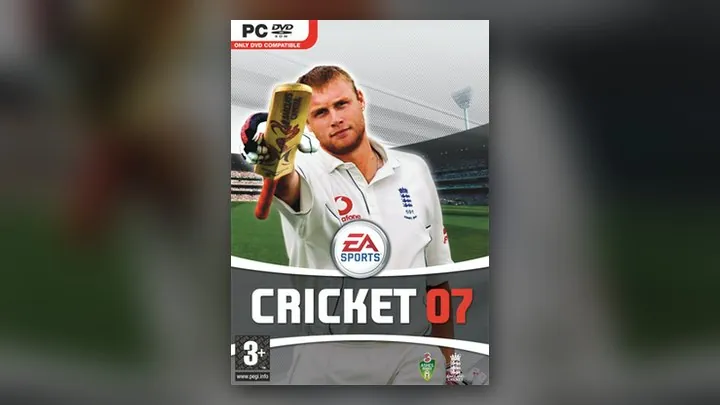
About Cricket 07
Play Cricket 07 free in your browser. No download, no install: it opens on cricket07.dhaiwat.com in a new tab.
Cricket 07 is the EA Sports cricket game from 2006, built by HB Studios with EA Canada for Windows and PlayStation 2, with Richie Benaud and Mark Nicholas in the commentary box. It covers Tests, four-day matches and limited-overs games of 50, 20, 10 or 5 overs, plus Ashes modes, world competitions and Australian and English domestic seasons. Only Australia, England, South Africa and New Zealand carried real player names, yet the PC version became a fixture for a whole generation of cricket fans, kept alive for years by roster and kit mods.
This browser version is by dhaiwat. The PC game has been recompiled to run in a web page, with graphics drawn through WebGPU. On your first visit the site downloads about 1.2 GB of game files into the browser's own storage, and a stopped download picks up where it left off. After that the game starts straight from that copy.
You can play solo against the computer, or with controllers on the same device, or start online 1v1 against a friend anywhere. Online play uses a room code, a choice of server region and an input delay setting for slower connections. A keyboard works fine, and a gamepad is merged with the keys. It is a fan project, not affiliated with EA Sports.
How to play Cricket 07
- Press Play. Cricket 07 opens in a new tab on dhaiwat's site. Use Chrome or Edge on a computer.
- Wait for the first download of about 1.2 GB. It is saved in the browser, so later visits start much faster.
- Choose Play Solo for matches against the computer or local controllers, or Play Multiplayer for online 1v1.
- For online, one player picks Create room (and a server between both players), then sends the room code or invite link. The friend types the code under Join, and the host presses Start match.
- Press Alt + Enter or the corner button for fullscreen. In menus, use the arrow keys, S to select and W to go back.
Controls
These are the keyboard controls listed on the port's own page. A controller works too.
Tips
- Let the first download finish on a stable connection and keep enough free disk space; the game needs about 1.2 GB of browser storage.
- Online, pick a room server between you and your friend. Leave input delay on Auto, or raise it if the match stutters on a weak connection.
- Hold Shift only for lofted shots you mean to clear the field with; normal shots on S are safer against good bowling.
- Use the arrow keys to place the ball before each delivery, then mix in a special delivery after a few stock balls.
Questions
- Can I play Cricket 07 online for free?
- Yes. The browser port is free, and Play Multiplayer lets you face a friend 1v1 online with a room code.
- Why does Cricket 07 take long to load?
- The first visit downloads about 1.2 GB of game files into your browser. After that it loads from storage and starts much faster.
- Does it work on Safari or a phone?
- It needs WebGPU and a lot of storage. Chrome or Edge on a computer is the reliable choice; Safari has had download errors.
- Can I use a controller?
- Yes. A gamepad works, and it is merged with the keyboard, so you can switch between them.
- Free
- No download
- Cricket 07 online
- Cricket 07 browser
- EA cricket game online
- Play cricket online free
- Cricket 2007
- EA Cricket 07
- EA Sports Cricket 07
Fan project, not affiliated with EA Sports.
Changelog
- Added
Games like Cricket 07
Counter-Strike 1.6
Live CS 1.6 servers in your browser: Dust2, Inferno, Office, surf and zombie mod.
Redcoats
Massive line-battle FPS: ride horses, fire cannons, sail warships and capture forts.
Salty Seas
Open-world pirate MMO: crew a warship, fire broadsides and board enemy ships.
WWE SmackDown! Here Comes the Pain
The 2003 PS2 wrestling classic, with online 1v1 and private rooms.
Mortal Kombat: Shaolin Monks
Liu Kang and Kung Lao's 2005 PS2 adventure, with online Versus.
Burnout 3: Takedown
The 2004 PS2 crash racer: takedowns, crashes and online races.
Midnight Club 3: DUB Edition
Rockstar's 2005 street racer from the PSP, with an online lobby.
WWE SmackDown vs. Raw 2011
The 2010 wrestling game from the PSP in a browser tab, with online rooms.
More free browser games
- Play GTA V in your browser
- Play LEGO Island in your browser
- Play Pokémon Redstone in your browser
- Play Taipei Rush in your browser
- Play Park Baron in your browser
- Play SandStorm in your browser
- Play Seedbed in your browser
- Play GTA Vice City in your browser
- Play GTA III in your browser
- Play Halo: Combat Evolved in your browser
- Play Hollow Knight in your browser
- Play Worms: Open Warfare 2 in your browser
- Play Guitar Hero III in your browser
- Play Cuphead Boss Fight: Wally Warbles (fan game) in your browser
- Play Need for Speed: Most Wanted in your browser
- Play PES 2014 in your browser
- Play FIFA 14 in your browser
- Play Need for Speed: Underground 2 in your browser
- Play Tekken 5: Dark Resurrection in your browser
- Play PES 2011 in your browser
- Play World at War Zombies in your browser
- Play Pokémon (18 games) in your browser
- Play Majesty Gold HD in your browser
- Play Portal in your browser
- Play No One Lives Forever in your browser
- Play The Elder Scrolls III: Morrowind in your browser
- Play Super Monkey Ball in your browser
- Play Quake (Episode 1) in your browser
- Play Crimsonland in your browser
- Play Snail Mail in your browser
- Play Harvest: Massive Encounter in your browser
- Play Dragon Ball Z: Budokai Tenkaichi 3 in your browser
- Play GTA: Chinatown Wars in your browser
- Play City Chase: Escape Police in your browser
- Play Mario Kart 8 Deluxe in your browser
- Play Team Fortress 2 in your browser
- Play The Binding of Isaac: Repentance+ in your browser
- Play Fortnite OG in your browser
- Play Tweetcraft in your browser
- Play Halo CE Mobile in your browser
- Play Super Mario Zombies in your browser
- Play DOOM II Multiplayer in your browser
- Play Quake III Arena in your browser
- Play Quake II in your browser
- Play QuakeWorld in your browser
- Play Return to Castle Wolfenstein in your browser
- Play Urban Terror in your browser
- Play Moon (Zombies) in your browser
- Play Kino der Toten in your browser
- Play Cheese Cube (Zombies) in your browser
- Play Black Ops II (Vibe Slops II) in your browser
- Play Modern Warfare 2 in your browser
- Play Diablo in your browser
- Play Half-Life in your browser
- Play Black Ops Zombies in your browser
- Play skate. 3 in your browser
- Play The Simpsons: Hit & Run in your browser
- Play Minecraft 1.8.8 in your browser
- Play Crash Bash Online in your browser
- Play PES 6 in your browser
- Play RuneScape Classic in your browser
- Play Surfd in your browser
- Play Cuphead in your browser
- Play Stardew Valley in your browser
- Play Among Us in your browser
- Play Lethal Company in your browser
- Play PEAK in your browser
- Play RimWorld in your browser
- Play Inscryption in your browser
- Play Bendy and the Ink Machine in your browser
- Play MiSide in your browser
- Play OneShot: World Machine Edition in your browser
- Play Helltaker in your browser
- Play FEZ in your browser
- Play Brotato Paws n' Claws in your browser
- Play Ravenfield in your browser
- Play Clustertruck in your browser
- Play Plague Inc in your browser
- Play Lobotomy Corporation in your browser
- Play Trombone Champ in your browser
- Play Granny 3 in your browser
- Play How to Fish in your browser
- Play SCP: Containment Breach in your browser
- Play Baldi's Basics Birthday Bash in your browser
- Play Boil Noodles at Night in your browser
- Play Cheese Rolling in your browser
- Play Dice A Million in your browser
- Play The Man From The Window 2 in your browser
- Play Beatblock in your browser
- Play Happy Room in your browser
- Play Ages of Conflict in your browser
- Play while True: learn() in your browser
- Play Crashout Crew in your browser
- Play The Message From Deep Space in your browser
- Play Dude, Stop in your browser
- Play Hill Climb Racing in your browser
- Play Toasterball in your browser
- Play Flash Games (878) in your browser
- Play Arcade Classics (227) in your browser