Play Guitar Hero III in your browser
By lasvegasherogame.com · Music · Classic
About Guitar Hero III
Play Guitar Hero III free in your browser. No download, no install: it opens on lasvegasherogame.com in a new tab.
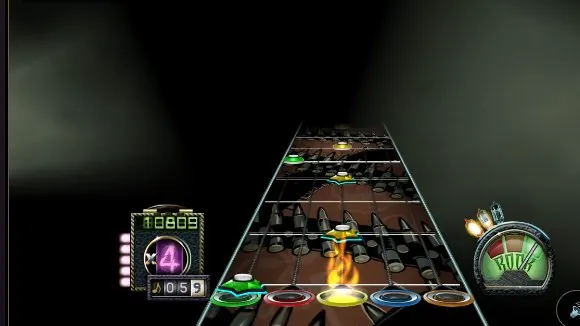
Guitar Hero III: Legends of Rock was the first Guitar Hero made by Neversoft, published by Activision and RedOctane in 2007 for PlayStation 2, PlayStation 3, Wii, Xbox 360 and later PC. You hold the colored frets and strum as notes scroll down the highway, chase star power, and climb from bar gigs to boss battles against Tom Morello and Slash. Its setlist runs from Foghat's Slow Ride, the opening song, to DragonForce's Through the Fire and Flames, still one of the hardest charts in rhythm games.
The web version at lasvegasherogame.com is a fan experiment that runs the original Xbox 360 game files in the browser. The game data streams in chunks and is cached, so you prepare the songs once and come back faster. It is still partial: menus can show no picture yet, and the page lists the steps the game takes on its own to reach the first song, Slow Ride. Two shortcuts skip the intro videos or go straight to playing.
You can play the frets on a keyboard or with an Xbox or PlayStation controller, and on a phone the page draws a diamond-shaped fret pad and a star power button. A lag test and a note offset setting help sync the notes with the music. The site is in Spanish.
How to play Guitar Hero III
- Press Play: the game opens in a new tab on lasvegasherogame.com.
- Let the page prepare the songs. This first download happens once and is then cached in the browser.
- Press Jugar (Play). Use 'Saltear intro' to skip the boot videos, or 'Ir directo a tocar' to skip the menus too and land on Slow Ride.
- Hold a fret key and strum with the down or up arrow as each note reaches the ring.
- If notes and music drift apart, open the menu (☰), go to 'Notas y sonido' and run 'Probar retraso (30 s)'.
Controls
Bindings as listed on the port's own page. Pressing a fret alone does not strum: hold the color and hit the strum key.
Tips
- Play in Chrome or Edge. The site warns that Brave delays the sound.
- Use wired headphones: Bluetooth adds audio delay that throws off your timing.
- If notes feel early, use 'Notas más tarde' (20 ms per click) until they line up. The offset is saved in your browser.
- Graphics start on the lightest quality. On a strong computer, raise it in the menu under Gráficos.
Questions
- Can I play Guitar Hero 3 in my browser?
- Yes, as a fan experiment that runs the original game files in a browser tab. It is still partial, with some menus missing graphics.
- Can I use a guitar controller or gamepad?
- A standard Xbox or PlayStation controller works with the Guitar Hero III layout: triggers and bumpers for frets, A or Cross for orange, D-pad to strum.
- Which songs can I play?
- The page takes you to Slow Ride, the first song of the career, and shows the steps the game follows to reach it.
- Is the site in English?
- The page is in Spanish, but the controls are simple: A S D F G for frets, the arrow keys to strum and Space for star power.
- Free
- No download
- Guitar Hero 3 browser
- Guitar Hero online free
- GH3 web
- Rhythm game
- GH3
- Guitar Hero 3
- Guitar Hero III: Legends of Rock
- Las Vegas Hero 3
Fan project, not affiliated with Activision or RedOctane.
Changelog
- Added
More free browser games
- Play GTA V in your browser
- Play Counter-Strike 1.6 in your browser
- Play LEGO Island in your browser
- Play Pokémon Redstone in your browser
- Play Taipei Rush in your browser
- Play Redcoats in your browser
- Play Salty Seas in your browser
- Play Park Baron in your browser
- Play SandStorm in your browser
- Play Seedbed in your browser
- Play GTA Vice City in your browser
- Play GTA III in your browser
- Play Halo: Combat Evolved in your browser
- Play Cricket 07 in your browser
- Play WWE SmackDown! Here Comes the Pain in your browser
- Play Mortal Kombat: Shaolin Monks in your browser
- Play Burnout 3: Takedown in your browser
- Play Hollow Knight in your browser
- Play Worms: Open Warfare 2 in your browser
- Play Cuphead Boss Fight: Wally Warbles (fan game) in your browser
- Play Need for Speed: Most Wanted in your browser
- Play Midnight Club 3: DUB Edition in your browser
- Play WWE SmackDown vs. Raw 2011 in your browser
- Play PES 2014 in your browser
- Play FIFA 14 in your browser
- Play Need for Speed: Underground 2 in your browser
- Play Tekken 5: Dark Resurrection in your browser
- Play PES 2011 in your browser
- Play World at War Zombies in your browser
- Play Pokémon (18 games) in your browser
- Play Majesty Gold HD in your browser
- Play Portal in your browser
- Play No One Lives Forever in your browser
- Play The Elder Scrolls III: Morrowind in your browser
- Play Super Monkey Ball in your browser
- Play Quake (Episode 1) in your browser
- Play Crimsonland in your browser
- Play Snail Mail in your browser
- Play Harvest: Massive Encounter in your browser
- Play Dragon Ball Z: Budokai Tenkaichi 3 in your browser
- Play GTA: Chinatown Wars in your browser
- Play City Chase: Escape Police in your browser
- Play Mario Kart 8 Deluxe in your browser
- Play Team Fortress 2 in your browser
- Play The Binding of Isaac: Repentance+ in your browser
- Play Fortnite OG in your browser
- Play Tweetcraft in your browser
- Play Halo CE Mobile in your browser
- Play Super Mario Zombies in your browser
- Play DOOM II Multiplayer in your browser
- Play Quake III Arena in your browser
- Play Quake II in your browser
- Play QuakeWorld in your browser
- Play Return to Castle Wolfenstein in your browser
- Play Urban Terror in your browser
- Play Moon (Zombies) in your browser
- Play Kino der Toten in your browser
- Play Cheese Cube (Zombies) in your browser
- Play Black Ops II (Vibe Slops II) in your browser
- Play Modern Warfare 2 in your browser
- Play Diablo in your browser
- Play Half-Life in your browser
- Play Black Ops Zombies in your browser
- Play skate. 3 in your browser
- Play The Simpsons: Hit & Run in your browser
- Play Minecraft 1.8.8 in your browser
- Play Crash Bash Online in your browser
- Play PES 6 in your browser
- Play RuneScape Classic in your browser
- Play Surfd in your browser
- Play Cuphead in your browser
- Play Stardew Valley in your browser
- Play Among Us in your browser
- Play Lethal Company in your browser
- Play PEAK in your browser
- Play RimWorld in your browser
- Play Inscryption in your browser
- Play Bendy and the Ink Machine in your browser
- Play MiSide in your browser
- Play OneShot: World Machine Edition in your browser
- Play Helltaker in your browser
- Play FEZ in your browser
- Play Brotato Paws n' Claws in your browser
- Play Ravenfield in your browser
- Play Clustertruck in your browser
- Play Plague Inc in your browser
- Play Lobotomy Corporation in your browser
- Play Trombone Champ in your browser
- Play Granny 3 in your browser
- Play How to Fish in your browser
- Play SCP: Containment Breach in your browser
- Play Baldi's Basics Birthday Bash in your browser
- Play Boil Noodles at Night in your browser
- Play Cheese Rolling in your browser
- Play Dice A Million in your browser
- Play The Man From The Window 2 in your browser
- Play Beatblock in your browser
- Play Happy Room in your browser
- Play Ages of Conflict in your browser
- Play while True: learn() in your browser
- Play Crashout Crew in your browser
- Play The Message From Deep Space in your browser
- Play Dude, Stop in your browser
- Play Hill Climb Racing in your browser
- Play Toasterball in your browser
- Play Flash Games (878) in your browser
- Play Arcade Classics (227) in your browser