Play Five Nights at Freddy's in your browser
By fnaffree.io · Horror · Survival · Classic
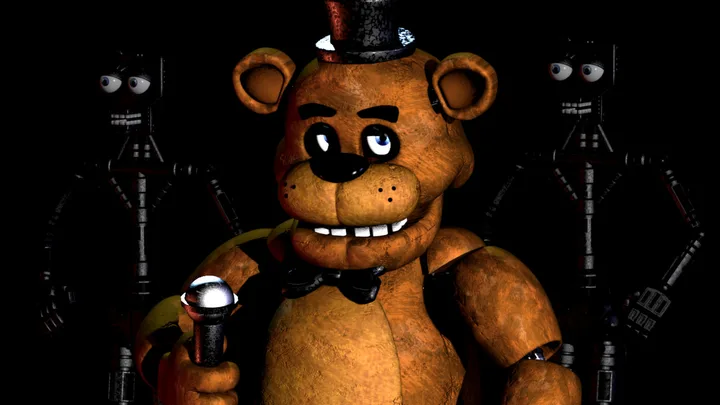
About Five Nights at Freddy's
Play Five Nights at Freddy's free in your browser. No download, no install: it opens on fnaffree.io in a new tab.
Five Nights at Freddy's is the 2014 point-and-click horror game by Scott Cawthon, made in Clickteam Fusion. You take the night shift as the security guard at Freddy Fazbear's Pizza, a family restaurant whose animatronic band walks the halls after closing. Freddy, Bonnie, Chica and Foxy each move in their own way, and you never leave your office: all you have are two doors, two hall lights and a camera system.
Every night runs from 12 AM to 6 AM and gets harder. Doors, lights and cameras all drain one battery, and when it runs out the office goes dark. The tension comes from watching, listening and deciding when a door is really worth the power.
This browser copy on fnaffree.io has the complete first game: the five main nights, Night 6, Custom Night with the 20/20/20/20 mode, Golden Freddy and the extras menu. It opens on fnaffree.io in a new tab. It is fan-hosted and not affiliated with Scott Cawthon.
How to play Five Nights at Freddy's
- Press Play. Five Nights at Freddy's opens in a new tab on fnaffree.io. Click inside the game to start; use headphones, the sounds matter.
- Each night lasts from 12 AM to 6 AM. Check the cameras with Space to see where the animatronics are.
- When something is in a hallway next to your office, flash that side's light (A or D) and close the door (Q or E) only while it is there.
- Watch the power left in the corner. Lights, doors and cameras all use it; reach 6 AM before it runs out.
- Beat Night 5 to unlock Night 6, and Night 6 to unlock Custom Night, where you set each animatronic's difficulty.
Controls
These are the keys shown on the port's own start screen.
Tips
- Do not keep a door shut just in case: it drains power fast. Check the light first, close only when someone is there.
- Keep an eye on Pirate Cove (camera 1C). If Foxy is peeking out, check him often; an open curtain means he is about to run down the west hall.
- Freddy gets active from Night 3 or 4 and hides in the dark. Checking him on camera slows him down.
- On the last hour, if power is low, stop using the cameras and only check the lights when you hear footsteps.
Questions
- Can I play FNAF for free in my browser?
- Yes. This copy of the first Five Nights at Freddy's runs free in a browser tab on fnaffree.io, with no download or install.
- Does it have all the nights?
- Yes. It has the five main nights, Night 6, Custom Night and the extras.
- What are the controls?
- Q and E close the left and right doors, A and D switch on the hall lights, Space opens the cameras, and the mouse looks around and picks cameras.
- Can I play on my phone?
- It is built for a computer with a keyboard. It may load on a phone, but the controls are made for keys.
- Free
- No download
- FNAF online
- FNAF browser
- Five Nights at Freddy's free
- FNAF unblocked
- Play FNAF no download
- FNAF
- FNAF 1
- Five Nights at Freddys
- FNAF Free
Unofficial fan-hosted copy, not affiliated with or endorsed by Scott Cawthon.
Changelog
- Added
More free browser games
- Play GTA V in your browser
- Play Counter-Strike 1.6 in your browser
- Play LEGO Island in your browser
- Play Pokémon Redstone in your browser
- Play Taipei Rush in your browser
- Play Redcoats in your browser
- Play Salty Seas in your browser
- Play Park Baron in your browser
- Play SandStorm in your browser
- Play Seedbed in your browser
- Play GTA Vice City in your browser
- Play GTA III in your browser
- Play Halo: Combat Evolved in your browser
- Play Cricket 07 in your browser
- Play WWE SmackDown! Here Comes the Pain in your browser
- Play Mortal Kombat: Shaolin Monks in your browser
- Play Burnout 3: Takedown in your browser
- Play Hollow Knight in your browser
- Play Worms: Open Warfare 2 in your browser
- Play Guitar Hero III in your browser
- Play Cuphead Boss Fight: Wally Warbles (fan game) in your browser
- Play Need for Speed: Most Wanted in your browser
- Play Midnight Club 3: DUB Edition in your browser
- Play WWE SmackDown vs. Raw 2011 in your browser
- Play PES 2014 in your browser
- Play FIFA 14 in your browser
- Play Need for Speed: Underground 2 in your browser
- Play Tekken 5: Dark Resurrection in your browser
- Play PES 2011 in your browser
- Play World at War Zombies in your browser
- Play Pokémon (18 games) in your browser
- Play Majesty Gold HD in your browser
- Play Portal in your browser
- Play No One Lives Forever in your browser
- Play The Elder Scrolls III: Morrowind in your browser
- Play Super Monkey Ball in your browser
- Play Quake (Episode 1) in your browser
- Play Crimsonland in your browser
- Play Snail Mail in your browser
- Play Harvest: Massive Encounter in your browser
- Play Dragon Ball Z: Budokai Tenkaichi 3 in your browser
- Play GTA: Chinatown Wars in your browser
- Play City Chase: Escape Police in your browser
- Play Mario Kart 8 Deluxe in your browser
- Play Team Fortress 2 in your browser
- Play The Binding of Isaac: Repentance+ in your browser
- Play Fortnite OG in your browser
- Play Tweetcraft in your browser
- Play Halo CE Mobile in your browser
- Play Super Mario Zombies in your browser
- Play DOOM II Multiplayer in your browser
- Play Quake III Arena in your browser
- Play Quake II in your browser
- Play QuakeWorld in your browser
- Play Return to Castle Wolfenstein in your browser
- Play Urban Terror in your browser
- Play Moon (Zombies) in your browser
- Play Kino der Toten in your browser
- Play Cheese Cube (Zombies) in your browser
- Play Black Ops II (Vibe Slops II) in your browser
- Play Modern Warfare 2 in your browser
- Play Diablo in your browser
- Play Half-Life in your browser
- Play Black Ops Zombies in your browser
- Play skate. 3 in your browser
- Play The Simpsons: Hit & Run in your browser
- Play Crash Bash Online in your browser
- Play PES 6 in your browser
- Play RuneScape Classic in your browser
- Play Surfd in your browser
- Play Cuphead in your browser
- Play Stardew Valley in your browser
- Play Among Us in your browser
- Play PEAK in your browser
- Play RimWorld in your browser
- Play OneShot: World Machine Edition in your browser
- Play Helltaker in your browser
- Play FEZ in your browser
- Play Brotato Paws n' Claws in your browser
- Play Ravenfield in your browser
- Play Clustertruck in your browser
- Play Plague Inc in your browser
- Play Trombone Champ in your browser
- Play How to Fish in your browser
- Play Baldi's Basics Birthday Bash in your browser
- Play Boil Noodles at Night in your browser
- Play Cheese Rolling in your browser
- Play Dice A Million in your browser
- Play The Man From The Window 2 in your browser
- Play Beatblock in your browser
- Play Happy Room in your browser
- Play Ages of Conflict in your browser
- Play while True: learn() in your browser
- Play Crashout Crew in your browser
- Play The Message From Deep Space in your browser
- Play Dude, Stop in your browser
- Play Hill Climb Racing in your browser
- Play Toasterball in your browser
- Play Flash Games (878) in your browser
- Play Arcade Classics (227) in your browser